RESCUE DOSE
A Cytotoxic compounding robot operator interface


01
About the project
ChemiDose is a robot that mixes chemotherapy medications for cancer patients with no human intervention.
The robot offers a better, faster, and safer way
for pharmaceutical labs to work
My role
Research
Project mapping and concepts
High fidelity mockups
Wireframes
Visual design
Usability testings
Challenges
There are five different users with different workflows.
Users can't make any mistakes in data insertion and robot operation.
Filter, simplify, and manage the loads displayed data at any stage of the process.
Objectives
Reduce compounding duration
Eliminate human errors in the medicine compounding process.
Eliminate risks to the pharmacists.
Design the system to work for all various compounding facilities and their different needs and requirements.
02
Research
I’ve made more than 25 interviews with end users, held 52 surveys to gather information
and spent 42 hours in total
observing the work process currently used in different pharmaceutical facilities.
Intakes
- Facilities work by two main methods, the product need to fit them both.
- Human errors are a huge challenge that needs to be addressed by the design.
- End users deal with tremendous amounts of data, some of which is mandatory
to be displayed by FDA regulation.

03
Problem definition
Using the conclusions from the research phase, I have characterized three personas to represent
the range of end users and defined the use cases and working methods for the entire system.
Intakes
- Facilities work by two main methods, the product need to fit them both.
- Human errors are a huge challenge that needs to be addressed by the design.
- End users deal with tremendous amounts of data, some of which is mandatory
to be displayed by FDA regulation.
Centralized
Coordinators type in the prescriptions to a central computer and distribute them between multiple operators. This works mainly for larger departments. time-efficient for large teams, but lack the decentralized agility


Decentralized
Robot operators work as stand-alone units to share the workload. each type in the details and run the robot
This method works best for smaller teams. Less time efficient for busy departments, but agile and quickly adapt changes.
Personas

“There are days that all we do is compound, with no time left for anything else"
Nur Jabarin
Asuta nurse and compounder

"The ergonomic aspects are crucial. We stand and be in focus
for 9 hours a day"
Ben Friedman
RemedixCare compounding manager

"The way we work is not agile enough for changes happening throughout the day"
Myriam Robin
Rambam compounding manager
04
Ideation
We made a few brainstorming and card-sorting sessions to establish the detailed workflows.
Also having studied the relevant FDA regulations and requirements we ideated to determine the info needed to be input and displayed at every step of the workflows
Intakes
- Three main screens for the entire system.
- Five detailed main workflows are needed.
- System was verified to work with both work methods.
Centralized- team coordinator flow
For the use of centralized larger pharmacies that use several robots in parallel.
In this use case, a few coordinators run the main computers to register new orders for the team, then send them to the compounders that operate two robots each.
This flow also lets the coordinator run an urgent order straight from the registration without waiting in priority if needed.


Centralized- Robot operator flow
Robot operators pull processes by the priority list to their two robots, usually while one is running they set up the other. they are in charge of physically loading the suitable vials and bags onto the machine, run and wrap-up the process.
Decentralized flow
In this operating method, the prescription details and the robot operation is done by the same person.

Sketching and Wireframing
05
Several design concepts have been made to include all restrictions and conditions of the two main use cases.
A major achievement was to get the company to change the industrial design to suit the workflow.
After sketching to prove the proper layouts, I've created several mockups to test and validate with
end-users before going forward to finalize the design.
Intakes
- Screening and filtering data within FDA boundaries were crucial for achieving functional screens.
- Having access to end users at all stages was critical to tune the solutions and getting the right design.
- Five full mockups were designed to test the full product with end users
.

Wireframing

Different robot cards design concepts

A concept separating the robot display and process queue to different screens

Trying different concepts for the main screen, and some robot card design
06
Detailed design
I funneled the entire system onto three main screens, from which end users can operate the system and get all the needed info
Intakes
- Facilities work by two main methods, the product need to fit them both.
- Human errors are a huge challenge that needs to be addressed by the design.
- End users deal with tremendous amounts of data, some of which is mandatory
to be displayed by FDA regulation.
Coordinator's main screen
Presenting all info the coordinators use when compounding while keeping a clear hierarchy between the different info segments and controls.


Robot display cards
Each represents a robot on the system and shows the only necessary info for its stage, while 'current status' and time to finish are most crucial at this point.
Correspondingly, these details are the only ones to have color.


Process queue
This scrollable list shows the process priority that is waiting to compound. this is the only place on the screen showing the full info for each prescription after filtering to show as least info as possible
under FDA rules.
While scrolling, the column's headlines remain stationary, while the list moves.
When hovering, lines are highlighted in grey. here again, color is only used to indicate actionable items.
Substance library screen
Showing the list of substances used by the pharmacy with all inner variables. From this list, the prescription order wizard draws its info.
This list is installed on system implementation and updated only when needed


Registered substances
This scrollable list shows a summary of only necessary info about each substance in use. As with the other scrollable lists in the product, when hovering, lines are highlighted in gray.
Each card line has only one actionable itemת a submenu containing
options for each
Process archive screen
Keeping the finished and canceled processes, so if a process needs to be repeated or in the unfortunate case something went wrong, it can be traced

Search and sort menus
A simple and intuitive search and sort menu. users can search by patient's name or ID.
Alternatively, users can choose to search a process by a date range.
Users can also sort search results by different criteria


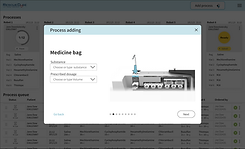
Process adding procedure screens
One of the key challenges to solve was the way a new prescription order is added to the system.
If a pharmacist or a coordinator makes a mistake at this stage, this could have a devastating effect

Vial position indicators
I've asked the company to add a color coding strip, with a different color and text for each vial position on the robot.
Using 3D renders of the machine pointing to the referred vial position on each stage, and the same color for the overlay banner I've added another validation step to this delicate procedure



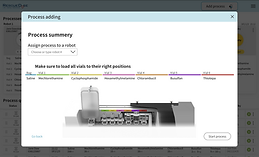


Procedure Validation
At the end of the prescription input, users are asked to double-check check all details are correct compared with the 3D rendered image and the physical color coding strip on the robot, as an additional validation measure.
substance adding procedure screens
Register substances into the system, usually done on system implementation.
The process involves defining multiple values for variable substance features.
The values entered are the ones to show on the dropdown menus of new prescription orders

Add substance form
The challenge here was to design
a simple and coherent form that holds variable Input fields and choice components.


07
Validation
Before introducing the final design, I tested the entire system with four different facilities on several occasions to get the right feedback to improve the design and close every loose end.
Another session of user testings was made to validate the final design when it was finished
Intakes
- Additional use cases needed to be added
- Sorting and filtering for the archived processes needed to approve
- Users can operate more than one robot at a time


Physical User testing
We tested the system connected to two robots via AXURE and let the teams work
with no intervention
Virtual User testing
We tested the entire system
on a fully working Figma prototype
before going for the final design.
Then went back to tweak and tune the design accordingly

08
Results
The product is now in its final development stages,
after getting FDA approval.
Results were mostly exceeding expectations, although some improvements are needed to the production version.
Mostly, I truly think I managed to harness the power of good design to improve people's lives!
+250% efficiancy
In compounding efficiency over time,
Designing the product so end users have the ability to compound up to three bags in parallel
-73% human errors
By designing an intuitive process
with visual details insertion aids
and multiple data validation steps
-60% presented data
While keeping essential data displayed
and maintain FDA rules and regulations